The order is ready to ship—except the last operation hasn’t been signed off, the material count is wrong, and the customer service team has already promised a truck. That’s a workflow problem before it’s a software problem. A custom manufacturing system should make those dependencies visible while there’s still time to act.
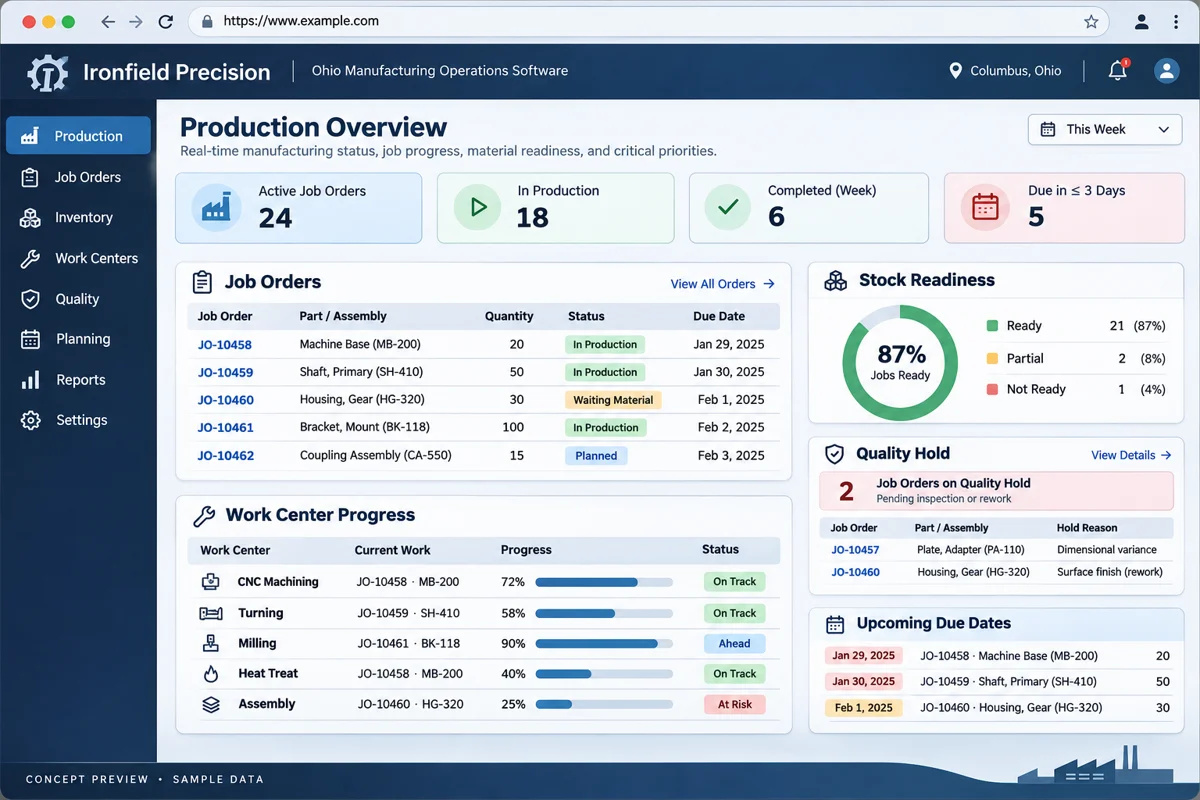
Custom manufacturing software is an application built around a manufacturer’s specific production and information flow. It can connect job orders, material availability, operation status, quality checks and reporting. It makes sense when a verified workflow gap cannot be handled economically through an existing product or supported configuration.
Features, workflow and outcomes
Features that address the daily bottleneck
Operation-level tracking
Planner sees the current operation, owner and blocker.
Available, reserved and quarantined inventory
Production can distinguish usable stock from a headline balance.
Revision-linked job records
The team can identify which approved specification applies.
Quality release queue
Dispatch sees the decision required before release.
How the workflow fits together
A relatable example
A component order is due Friday. Planning sees a material shortage, the floor sees a quality hold, and customer service sees the original ship date. A connected job record brings those three facts together before another promise goes to the customer.
- Release the approved job and drawing revision.
- Confirm usable material and reserve it against the job.
- Capture operation progress and hold reasons at the work center.
- Review quality exceptions before dispatch.
- Share an approved delivery update with the customer-facing team.
How to judge whether it helps
These are intended operating improvements to validate in a pilot. They are not promised financial or performance results.
| Feature | Useful outcome | Measure against your baseline |
|---|---|---|
| Operation-level tracking | Planner sees the current operation, owner and blocker. | Time spent finding job status |
| Available, reserved and quarantined inventory | Production can distinguish usable stock from a headline balance. | Jobs released with unresolved shortages |
| Revision-linked job records | The team can identify which approved specification applies. | Revision-related corrections |
| Quality release queue | Dispatch sees the decision required before release. | Aging quality holds |
Start with the factory handoff that keeps breaking
Pick one recurring problem: jobs released without material, missing operation updates, stock adjustments with no explanation, or a delivery date nobody can support. Follow an actual order through sales, planning, the floor, inspection and shipping. Record where people copy data and where they make a decision.
For a make-to-order component shop, the critical record may be the job and drawing revision. For a small assembly plant, it may be the approved bill of materials and component availability. Those businesses should not receive the same specification simply because both manufacture products.
Include operators and planners in discovery. A dashboard designed only with management may report neatly while the people supplying the data keep using paper.
The features worth defining before development
- Job orders: customer reference, quantity, due date, drawing or specification revision and responsible planner.
- Production tracking: operation started, completed, held or returned for rework.
- Inventory: on-hand, reserved, available and quarantined stock kept distinct.
- Quality: inspection requirements, release authority and recorded exceptions.
- Reporting: late work, missing materials, queue age and planned versus actual effort.
Odoo’s manufacturing documentation illustrates how bills of materials connect components and operations. Use that as a useful reference model, then verify your own requirements rather than assuming custom development is the only way to obtain those features.
Define benefits as measurable operating changes
Replace “better visibility” with a question a supervisor can answer: which jobs cannot start, which operation is holding a shipment, and which material shortage affects tomorrow’s schedule? Define the source and update frequency for every number.
Before launch, measure a small baseline: time spent finding job status, missing updates, duplicate entries and corrections after release. Compare the same measures during the pilot. A faster screen is not a useful improvement if the underlying records are still unreliable.
Do not promise a percentage productivity gain before the workflow is measured. The first benefit may be a dependable exception list rather than a dramatic increase in output.
Turn the workflow into a scoped first phase
Bring one redacted job traveler and the status report your planner uses today.
Plan my production workflow ↗2027 development cost: transparent planning scenarios
These are illustrative budgeting calculations prepared on November 5, 2026, not Deepak Softech quotes or verified 2027 market averages. At an assumed blended rate of $50 per hour, a 300-hour job-status pilot calculates to $15,000; a 700-hour production-and-inventory phase to $35,000; and a 1,400-hour multi-workflow release to $70,000. Your supplier’s rate and estimated effort may differ substantially.
Use the hours to ask what is included: discovery, interface design, permissions, imports, integrations, testing, training and deployment. A plant-floor capture method, accounting connection or complex migration can change the scope more than another dashboard.
Budget hosting, monitoring, backup, support and future changes separately. Compare three-year ownership cost with a configured commercial product before approving a build.
Build, configure or extend?
Test the closest existing product against one difficult order. Can it support your revisions, partial completions, material reservations and quality hold without a second unofficial register? If yes, configuration may be the practical choice. If the gap is limited, an integration or companion application may be enough.
Custom software becomes a stronger option when the workflow itself is distinctive and the workarounds are costly, persistent and well understood. Ask who will own the code, where data can be exported and who maintains the application after launch.
Pilot one product family before the entire plant
Choose a representative product family and a small team. Include a shortage, a drawing revision, a partial completion and a failed inspection. Ask the next shift to continue using the records alone. Can they tell what happened and what to do next?
Agree on a rollout decision before the pilot starts. A practical acceptance test is an order that moves from release to dispatch with a traceable revision, material record and approval history. Expand only when the people doing the work can maintain that history without double entry.
Bring a redacted traveler, inventory export and example status report to a scoping call. That gives a developer something concrete to estimate.
Frequently asked questions
How much does custom manufacturing software cost?
It depends on workflows, integrations, data quality and rollout scope. The article’s $15,000, $35,000 and $70,000 examples are calculations at an assumed $50/hour, not quotes or market averages.
Can it connect to our existing ERP?
Check the ERP’s supported APIs, imports and permissions. Define which system owns orders, stock and accounting records before building a connection.
Is custom software better than manufacturing ERP?
Not automatically. Test configuration and extension options first. A custom application is useful when a verified workflow gap justifies its ownership cost.
Which manufacturing niche should start small?
A make-to-order machine shop can pilot job status and revision tracking; a small assembly plant can start with material readiness and operation completion.
What should I prepare for a project discussion?
Bring one redacted job traveler and the status report your planner uses today. The goal is to identify the first useful scope and its dependencies.
Sources and editorial notes
Reviewed November 5, 2026 by the Deepak Softech editorial team. Workflow scenarios and budgeting calculations are illustrative. Product capabilities, terms and prices should be verified with the provider. Concept images contain fictional organizations and sample data.
This is a forward planning guide for 2027, prepared using information available in November 2026.
Bring one redacted job traveler and the status report your planner uses today.
What we can scope: A first-phase scope covering job records, material readiness, operator updates and quality handoffs.
Plan my production workflow ↗Explore the relevant development service · Browse the complete guide collection
 Chat with us