The spreadsheet says there are enough components. The floor says half are reserved for another order, some are in quarantine and the rest arrive next week. Material planning starts with defining what is actually available—not with a more colorful shortage report.
Custom MRP software translates demand and bills of materials into time-based material requirements. It considers usable stock, reservations, scheduled receipts, lead times and planning rules, then shows shortages and proposed actions. Its output is only dependable when the underlying quantities, revisions and dates are maintained.
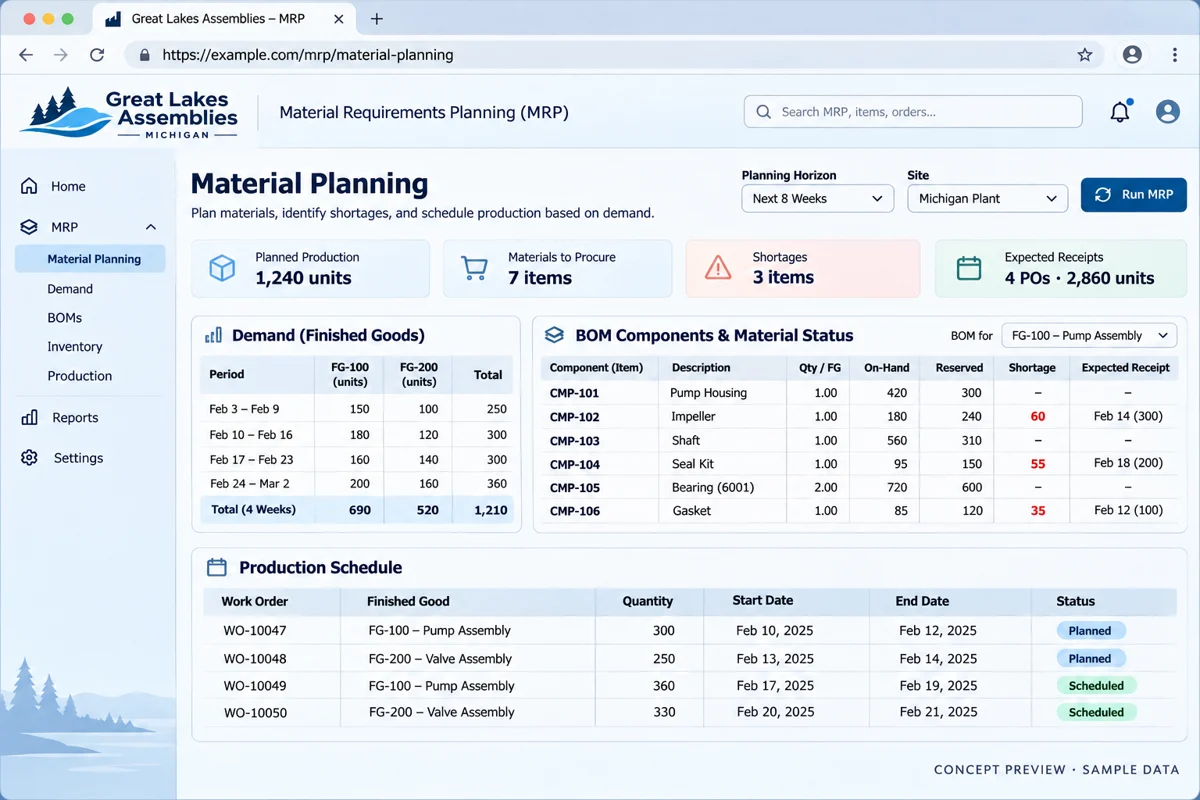
Features, workflow and outcomes
Features that address the daily bottleneck
Demand-linked reservations
Planners see which order can use each quantity.
Time-based net requirements
Buyers can see gaps before the need date.
Explainable recommendations
The buyer can trace a proposal back to demand and receipts.
Approved-action history
A second planning run recognizes previous decisions.
How the workflow fits together
A relatable example
Two orders need the same component. The spreadsheet shows enough stock for either job, but not both. Reservations, priorities and receipt dates must be considered together before a buyer approves another purchase.
- Confirm demand, need dates and the approved BOM.
- Separate usable stock from reserved or quarantined quantities.
- Apply scheduled receipts and lead-time assumptions.
- Review shortages and proposed actions with the buyer.
- Approve actions and reconcile the next planning run.
How to judge whether it helps
These are intended operating improvements to validate in a pilot. They are not promised financial or performance results.
| Feature | Useful outcome | Measure against your baseline |
|---|---|---|
| Demand-linked reservations | Planners see which order can use each quantity. | Reservation conflicts |
| Time-based net requirements | Buyers can see gaps before the need date. | Released jobs waiting for material |
| Explainable recommendations | The buyer can trace a proposal back to demand and receipts. | Recommendations requiring manual reconstruction |
| Approved-action history | A second planning run recognizes previous decisions. | Duplicate recommendations |
Get the planning inputs straight
Define the demand source: confirmed sales orders, forecasts, internal replenishment or a combination with clear priorities. Give each demand line a required date and revision where relevant. Decide who can change those inputs after planning.
The bill of materials must identify the correct components and quantities. Odoo’s official BOM documentation is one example of how components and operations are structured. In your own process, include units, scrap assumptions and approved substitutes only when their meaning and ownership are clear.
Separate stock on hand from stock you can use
Track reserved, quarantined and otherwise unavailable quantities explicitly. An inventory count cannot support a plan if every unit is treated as available for every job. Define when material becomes reserved and when a canceled job releases it.
Illustrative shortage: demand requires 120 units, usable unreserved stock is 70 and a confirmed receipt of 30 arrives before the need date. The remaining gap is 20. If the receipt arrives late, the near-term gap is larger. The date matters as much as the quantity.
Run the same calculation with purchasing and planning before automating it. Disagreement usually points to an unspoken rule.
Materials and capacity need different checks
A material plan answers whether components can be available when needed. It does not automatically prove that a machine, operator or supplier has capacity. Add work-center calendars, operation dependencies and realistic durations if production scheduling is part of the scope.
Label a proposed date as proposed until the relevant constraints are checked. Avoid presenting a calculated finish date as a customer promise. Define who approves an expedited purchase, alternate component or schedule change.
Turn the workflow into a scoped first phase
Bring an anonymized BOM, stock-category list and one shortage example.
Review my material planning process ↗Make the exception queue the useful output
Prioritize shortages affecting released work, overdue receipts, invalid BOMs and demand without a usable need date. Every exception needs a responsible person and a next action. A long list with no owner becomes another spreadsheet.
- Buyer: confirm supplier dates and purchase quantities.
- Planner: approve priority changes and release decisions.
- Engineering: review revision and substitute questions.
- Inventory: resolve count and quarantine discrepancies.
Keep an explanation of the recommendation. Users should be able to see which demand and receipt produced a shortage rather than accepting an unexplained number.
Do not start with automatic purchase orders
Begin with reviewed recommendations. Test pack sizes, minimum quantities, duplicate runs and changed supplier dates. Decide what happens if demand changes between calculation and approval.
A custom application may be a planning layer connected to an existing stock system rather than a complete ERP. Define the source of truth for inventory movements, purchasing and production. Avoid two systems independently updating the same balance.
Pilot a manageable product family
Choose a product with enough complexity to expose the rules: a multi-level assembly, shared component, late receipt and changed order. Reconcile the plan manually and document each discrepancy. Test a second run to confirm it does not duplicate approved actions.
For scope and cost, bring BOM samples, stock categories, lead-time rules and a purchasing export. Include data cleanup and reconciliation in the estimate. A planning engine built on unmaintained inputs will calculate quickly without becoming trustworthy.
Frequently asked questions
How is MRP different from inventory software?
Inventory records movements and availability; MRP uses demand, BOMs and dates to propose material actions. The two must agree on usable stock.
Can MRP replace production scheduling?
Not by itself. Capacity, calendars and operation dependencies need their own rules if the scope includes feasible production dates.
Can we move from Excel gradually?
Yes. Pilot one product family, reconcile outputs and keep one authoritative inventory source while the new planning process is tested.
What makes custom MRP costly?
Complex BOM revisions, shared components, poor data quality, integrations and exception rules can require more work than the calculation itself.
What should I prepare for a project discussion?
Bring an anonymized BOM, stock-category list and one shortage example. The goal is to identify the first useful scope and its dependencies.
Sources and editorial notes
Reviewed November 5, 2026 by the Deepak Softech editorial team. Workflow scenarios and budgeting calculations are illustrative. Product capabilities, terms and prices should be verified with the provider. Concept images contain fictional organizations and sample data.
Bring an anonymized BOM, stock-category list and one shortage example.
What we can scope: A material-planning pilot covering input ownership, shortage rules and reviewed purchase recommendations.
Review my material planning process ↗Explore the relevant development service · Browse the complete guide collection
 Chat with us