A customer asks whether the parts will ship Friday. The job board says “in production,” which could mean waiting for material, halfway through machining or sitting at inspection. A useful WIP system replaces that broad label with the operation, the blocker and the next decision.
Job shop WIP software tracks unfinished jobs through their operations, including queued, started, completed and held work. It connects job quantity, material readiness, labor or machine time and outside processing so planners can distinguish progress from waiting and compare estimated effort with actual effort.
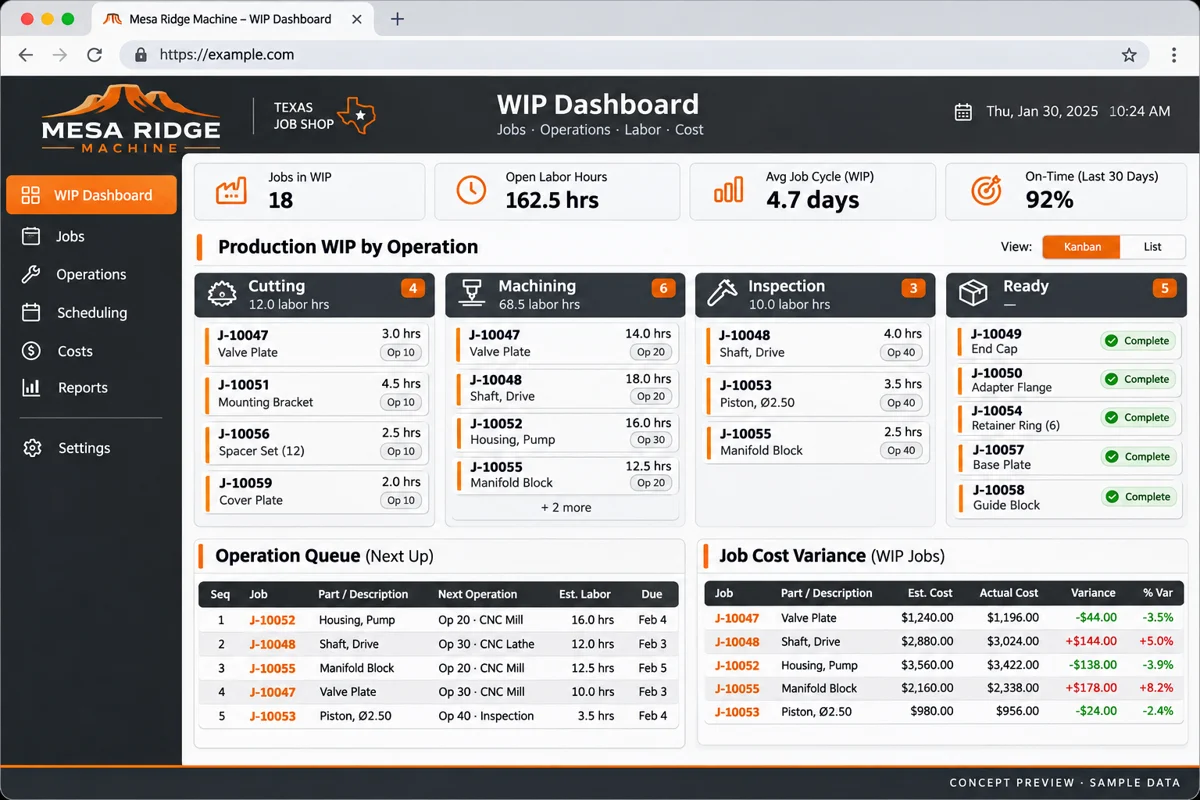
Features, workflow and outcomes
Features that address the daily bottleneck
WIP by operation and quantity
The next shift can explain where the unfinished work sits.
Hold reasons and queue age
Supervisors can focus on the blocker rather than chase every job.
Estimated and actual effort
Estimating can investigate setup or run-time differences.
Supplier-operation tracking
Dispatch and receipt become part of the job history.
How the workflow fits together
A relatable example
A 40-piece job has 25 parts through machining, 10 waiting on a fixture and five at inspection. One job-level status hides that split. An operation record makes the remaining work and the reason for waiting visible.
- Load the job route and required quantity.
- Capture setup, run, partial completion and hold events.
- Record outside-service dispatch and return.
- Review estimated versus actual effort with context.
- Release the finished quantity after inspection.
How to judge whether it helps
These are intended operating improvements to validate in a pilot. They are not promised financial or performance results.
| Feature | Useful outcome | Measure against your baseline |
|---|---|---|
| WIP by operation and quantity | The next shift can explain where the unfinished work sits. | Status enquiries and missing updates |
| Hold reasons and queue age | Supervisors can focus on the blocker rather than chase every job. | Hours in unresolved hold states |
| Estimated and actual effort | Estimating can investigate setup or run-time differences. | Unexplained effort variance |
| Supplier-operation tracking | Dispatch and receipt become part of the job history. | Overdue outside-processing returns |
Make the operation the unit of progress
A job-level status is useful for customers, but the planner needs the route underneath it. Identify the current operation, required quantity, completed quantity, remaining work and responsible work center. Record partial completions without treating the entire job as finished.
For a CNC shop, separate setup from run time when that distinction affects quoting. For sheet metal, track the handoff between cutting, forming and finishing. For jobs sent outside, show dispatch and expected return rather than pretending the operation is on your floor.
Capture updates where work happens
Choose an update method operators can use: a shared terminal, tablet, barcode scan or another supported workflow. The choice depends on the environment and the frequency of updates. A detailed form is not helpful if nobody has time to complete it.
Keep start, pause, complete and hold actions understandable. If the operator pauses because tooling is missing, let them choose a useful reason. Give supervisors a way to correct a record with a history, rather than encouraging invented times just to move the job forward.
Connect progress to job cost carefully
Agree on the cost model before putting dollar values on the screen. Labor, machine, material and outside-service costs may come from different records. Decide which rates apply and how corrections are approved.
Illustrative example: a job estimated at four setup hours takes six. At an assumed $60 hourly setup cost, the variance is $120. That arithmetic identifies a quoting or operating question; it does not prove why the extra time occurred.
Do not confuse operational WIP visibility with financial inventory valuation. Have finance define the accounting treatment and reconciliation process. The application should preserve the records needed for that review.
Turn the workflow into a scoped first phase
Bring one redacted traveler with partial quantities or outside processing.
Map my job shop WIP process ↗Design the WIP board around decisions
Show jobs at risk, work waiting for the next operation, holds, outside processing and completed work awaiting inspection. Let each summary open its underlying records. An attractive utilization chart is less useful than a reliable list of jobs that cannot move.
- Filter by due date, work center, customer and product family.
- Show the age and reason for a hold.
- Distinguish scheduled dates from confirmed progress.
- Keep drawing and routing revisions visible.
Use a small number of shared definitions. If one shift records inspection as complete and another uses the same label for shipment, comparisons will mislead.
What a practical first release includes
Start with a job register, routes, operation updates, hold reasons and one management view. Add cost capture if the source data and ownership are ready. Integrations with estimating, inventory or accounting should be explicit scope items.
Compare commercial job-shop products with a custom layer around your existing system. If the main problem is collecting operation updates, you may not need to replace purchasing and invoicing at the same time.
Test WIP with a late job, not just a clean one
Choose a job with a split quantity, rework or an outside process. Ask the next shift to explain its status without calling the previous operator. Check whether the report can identify the missing information as well as the completed work.
Measure update completeness, time spent finding status and unexplained differences between estimates and actual effort. Use the pilot to refine the capture process before rolling it across the shop. Bring one redacted traveler and a sample costing worksheet to discovery; those artifacts are more useful than a long feature wish list.
Frequently asked questions
What does WIP mean in a job shop?
Work in progress is unfinished work moving through the production route. Operational tracking and accounting valuation are related but need separately defined rules.
Can operators use barcode updates?
Yes, if the hardware and application support the workflow. Test scan recovery, shared devices and corrections in the actual work environment.
Should WIP software include job costing?
Include it when rates, time records and material sources are defined. Otherwise, establish trustworthy progress capture first.
Can it track outsourced finishing?
Model dispatch, supplier, expected return, received quantity and exceptions as an outside operation rather than an unexplained gap.
What should I prepare for a project discussion?
Bring one redacted traveler with partial quantities or outside processing. The goal is to identify the first useful scope and its dependencies.
Sources and editorial notes
Reviewed November 5, 2026 by the Deepak Softech editorial team. Workflow scenarios and budgeting calculations are illustrative. Product capabilities, terms and prices should be verified with the provider. Concept images contain fictional organizations and sample data.
Bring one redacted traveler with partial quantities or outside processing.
What we can scope: A WIP pilot scope with operator capture, hold reasons and an operations dashboard.
Map my job shop WIP process ↗Explore the relevant development service · Browse the complete guide collection
 Chat with us