A new appraisal file arrives with three attachments, two proposed dates and a contact list that changes before lunch. By the end of the week, someone is asking which report is current. The fix isn’t another shared folder. It’s a file workflow people can follow.
Manage case intake, role and conflict review, appraiser availability, scheduling, document requests and approved report versions. Keep each participant’s access separate and record who reviewed or released a document. Software should organize the process without deciding professional eligibility or the appraisal outcome.
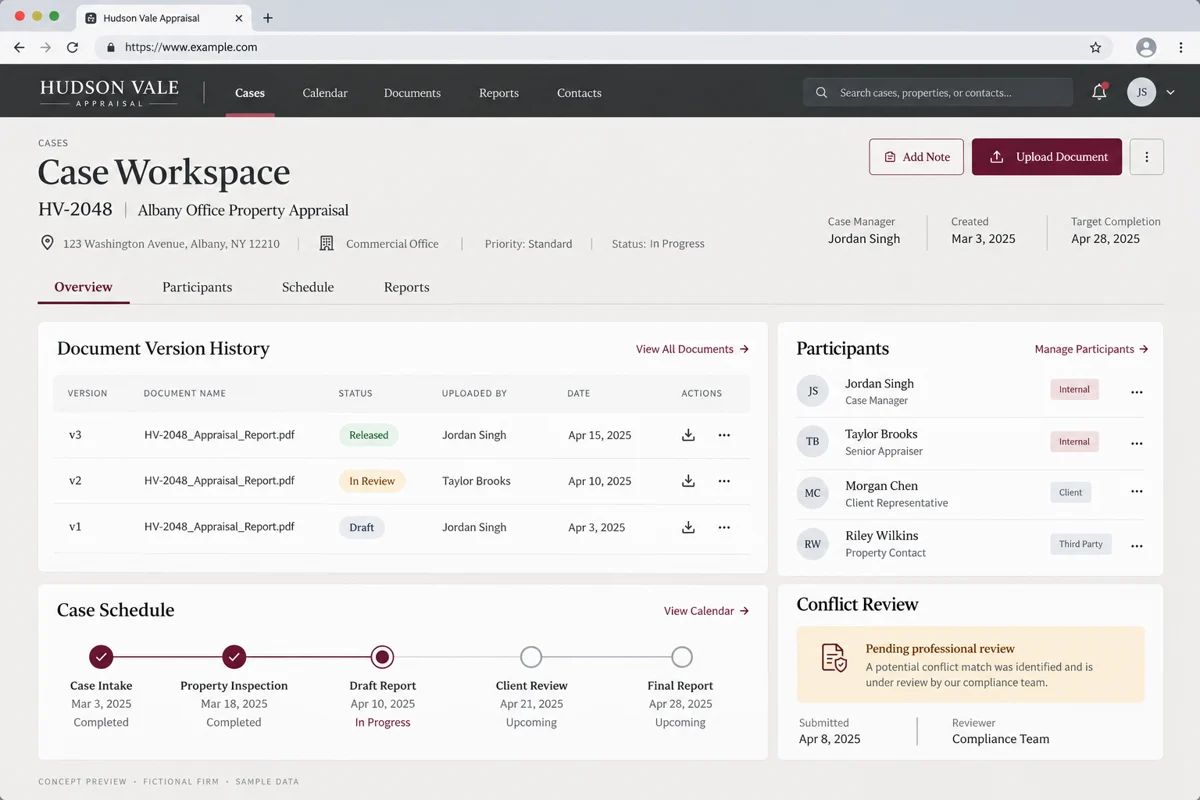
Start with a case record, not a calendar event
Give the file a stable identifier. Record the property, parties, contact roles, assignment source, requested service and known scheduling constraints. Keep the original instructions available. Distinguish a request for an appraiser from a request for an umpire so the first handoff goes to the right review queue.
A proposed appointment is not an accepted engagement. Use a pending stage until the firm has completed its review. If information is missing, the case should show exactly what the coordinator is waiting for and who is expected to provide it.
Put role and conflict review ahead of dispatch
The IAUA’s ethics guidance emphasizes fair and honest conduct in the appraisal process. For software planning, that supports a practical distinction: an available person is not automatically an approved person for the file.
Build a review step that records the designated reviewer, the information considered, questions sent out and the decision. Let the firm define its process with qualified advisers for the work and jurisdictions involved. Don’t label a software checkbox as proof of independence or universal compliance.
Keep participant roles explicit. Access appropriate for a coordinator may be too broad for an external participant. Test permissions with realistic documents before inviting people into a live case.
Schedule around people, travel and missing information
An availability board should show tentative holds separately from confirmed appointments. Include timezone, location, travel constraints and any prerequisite documents. When a date changes, retain the prior event and the reason instead of silently overwriting the calendar.
Here’s a useful acceptance scenario: a coordinator proposes an inspection, one participant requests a different time and the assigned professional needs a missing document first. The system should expose both blockers without sending the same reminder to everybody.
Know which report is approved for release
Use document states such as draft, in review, changes requested and approved for release. Record the author, version, reviewer and release event. A filename ending in “final-final” is not a reliable approval process.
Keep working notes separate from participant-facing material. When a replacement document is released, preserve the earlier version and make its status obvious. A recipient should not have to guess whether an old download is still current.
- Who can upload a draft?
- Who may request changes?
- Who can approve external release?
- Can a coordinator prove which version was sent?
Let the website collect the right assignment request
A focused website should explain the services the firm actually provides, the areas it serves and the information needed to request a file review. Use separate inquiry paths where appraiser work and umpire work need different questions.
Keep the public form short. Request the contact’s role and a useful summary, then move documents into a controlled case workflow. Explain the next step without implying that submitting a form appoints a professional or guarantees acceptance.
Test one complete file before expanding
Use a fictional case with a changed appointment, a participant who should not see internal notes and a report returned for edits. Ask a coordinator to retrieve the latest released version without help. Ask a reviewer to explain the history.
For scope, bring your intake template, participant roles, scheduling rules and a redacted report approval sequence. Define retention, export and access removal as part of the project. A portal is easier to approve when everyone can see what happens after a case closes.
Questions firms ask before starting
Can this replace professional conflict review?
No. Software can capture information and route a review, but the responsible professionals must determine eligibility and conflicts under the applicable requirements.
Can appraisers and umpires use separate workflows?
Yes. Use explicit roles, intake paths and permission sets rather than treating every participant as the same user type.
What is the most useful report feature?
A clear approval and release history that identifies the version sent, the recipient and the responsible reviewer.
Should the public website accept complete case files?
Use a short request form first unless a controlled upload process, access model and retention policy have been designed.
References and editorial notes
These references provide industry context. The workflow recommendations and examples above are editorial design guidance, not a case study, an endorsement of a vendor or a statement of requirements in every state. Confirm applicable professional and client requirements with the people responsible for your firm.
Send a redacted intake form and report approval sequence. Deepak Softech can map scheduling, participant access and document release into a focused software scope.
Organize your case-to-report process ↗Custom insurance workflow software · Professional website redesign
 Chat with us