Your Florida office has a file waiting on an appraiser. Texas has an inspection on the calendar, but no report owner. New York has finished the work and is waiting on payment. If each office keeps its own spreadsheet, a national claims count won’t tell you where to act next. A shared claims workspace should.
Track each claim by office and property location, its current status, the responsible team member, any appraiser assignment and the next action. Connect completed work to service invoices so managers can see collected and pending payments without confusing the firm’s fees with insurance settlements.
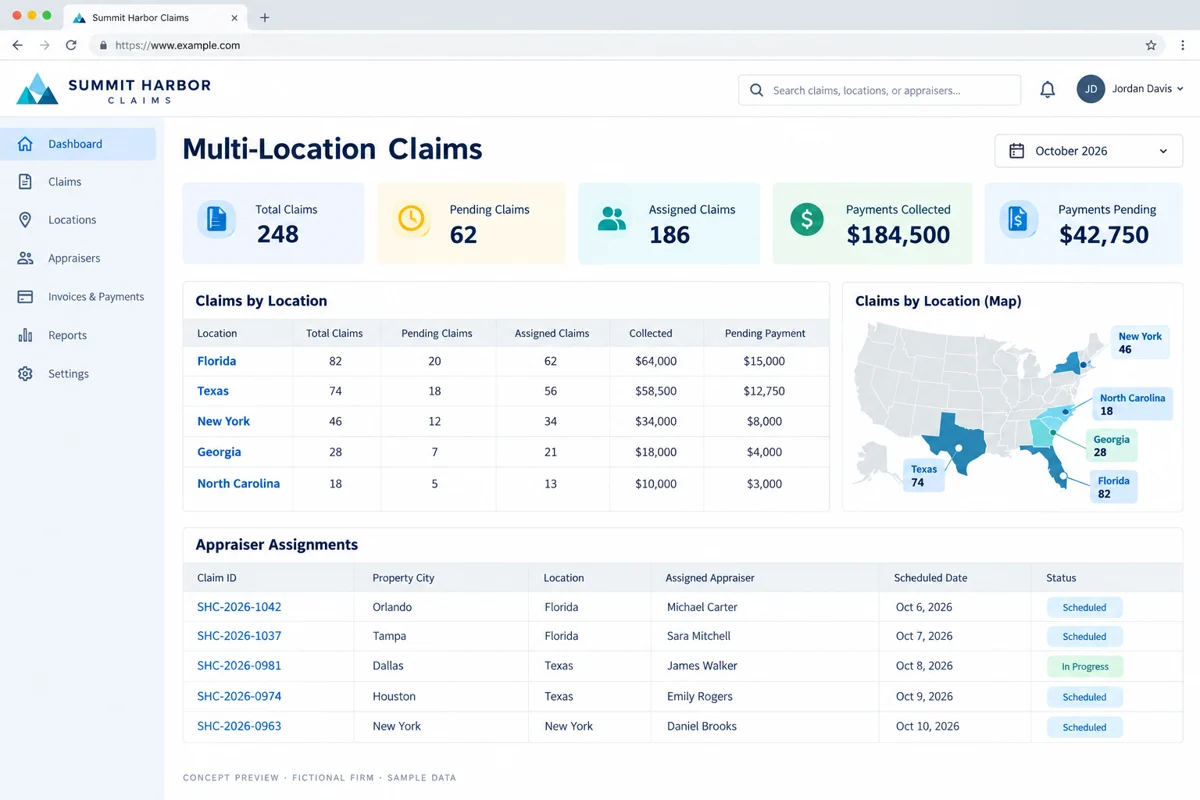
One claims workspace, with clear location ownership
Start with two separate fields: the office responsible for the work and the location of the property. A Texas team may handle a Florida assignment. If those fields are combined, regional reporting becomes unreliable as soon as work crosses an office boundary.
Give every claim a stable internal identifier and preserve the client’s reference number. Store the responsible office, property address, client, claim type, current owner and next action. Use the same status definitions across offices so “assigned” means the same thing in every report.
A regional manager should be able to open Florida, Texas, New York, Georgia or North Carolina and see the files that need attention. National staff should see the combined workload without losing the underlying office responsibility.
Separate pending claims from work already assigned
“Pending” is too broad to stand alone. Show the reason: awaiting intake details, waiting for assignment, awaiting access, report review or a response from the client. Attach an owner and the next action to each exception.
Use distinct events for assignment offered, accepted, inspection scheduled, report submitted, returned for edits and delivered. Sending an email does not prove that an appraiser accepted the work. An unaccepted assignment belongs in a queue that dispatch can review.
Keep claim progress separate from billing status. A delivered report can still have an unpaid invoice. A deposit can be collected while the file remains open. Combining those two processes into one status hides useful information.
Assign appraisers with availability and review in view
An assignment panel should show the professional’s role, service area, confirmed availability and current workload. Record who checked the relevant qualification and engagement requirements, and when. A populated roster is not proof that someone is cleared for every file.
For a mixed practice, distinguish appraisers, adjusters, coordinators and reviewers. Route role or conflict questions to the responsible professional before confirming an assignment. Software can collect information and preserve a decision; it should not make a professional eligibility determination on its own.
Test a realistic handoff: a coordinator offers an assignment, the appraiser declines because of capacity, and another person accepts. Can the next shift see the reason, new owner and inspection date without rebuilding the story from messages?
What the multi-location dashboard should show
The preview below uses fictional service-invoice data. It illustrates one possible reporting layout, not a client result or a performance promise.
| Location | Claims | Pending | Assigned | Collected | Payment pending |
|---|---|---|---|---|---|
| Florida | 82 | 20 | 62 | $64,000 | $15,000 |
| Texas | 74 | 18 | 56 | $58,500 | $12,750 |
| New York | 46 | 12 | 34 | $34,000 | $8,000 |
| Georgia | 28 | 7 | 21 | $18,000 | $4,000 |
| North Carolina | 18 | 5 | 13 | $10,000 | $3,000 |
| Total | 248 | 62 | 186 | $184,500 | $42,750 |
In this simplified example, pending means not yet assigned; assigned includes work in progress. A production dashboard needs explicit definitions for closed files, canceled assignments and reopened work. Every total should open a filtered list of the records behind it.
Track collected and pending payments without double counting
For this workflow, payment means the firm’s service invoices—not insurance proceeds, claim reserves or settlement amounts. Keep those concepts separate in the data model, screen labels and exports.
Connect an invoice to the claim, client and billing office. Record the amount due, due date, applied payments, credits and remaining balance. A partially paid invoice should show the collected amount and outstanding balance separately. Avoid counting the entire invoice in both totals.
Use an aging view for unpaid balances and reconcile against the accounting system that remains the financial source of truth. Define whether regional totals follow the billing office or property location, and label the date basis: payments received during a period and balances outstanding at a cutoff are different measures.
If a payment connection is part of the scope, define supported imports or APIs, duplicate protection, reconciliation and who may correct a record. A dashboard should explain the numbers, not replace review with a green badge.
Give each office the access it needs
Define office-level and role-level access before migrating documents. A national operations manager may need multiple regions, while a field professional needs only assigned files. External clients should see reviewed updates and approved documents rather than internal working notes.
Test access with separate sample accounts. Include reassignment, a departing staff member and a shared document link. Confirm that changing an office or removing a user updates access as intended, while preserving the claim history.
Pilot one cross-office workflow before a full rollout
Start with a small set of claims from two locations. Import enough history to test reassignment and document retrieval. Include one unaccepted assignment, one report return, a partial payment and an invoice credit.
- Can dispatch find every unassigned file?
- Can a manager trace a location total to its records?
- Can the reviewer find the released report version?
- Can billing explain the collected and outstanding amounts?
- Can the next shift identify the owner and next action?
Bring your office structure, current status definitions, roster fields and redacted invoice examples to discovery. A focused first release may connect your existing claims and accounting tools rather than replace everything. Compare proposals against that workflow, including migration, permissions, testing and support.
Questions firms ask before starting
Can we manage Florida, Texas and New York in one dashboard?
Yes. Model offices and property locations separately, use consistent statuses and grant regional access by role. Verify the professional requirements applicable to each assignment.
Can the system assign claims to appraisers?
It can manage offers, acceptance, scheduling and workload. Keep professional eligibility and conflict review with the responsible people.
What does payment collected mean in this dashboard?
It means payments applied to the firm’s service invoices. It does not mean insurance payouts or settlement amounts.
Can collected and pending payments appear together?
Yes. Track applied payments and remaining balances separately, including partial payments and credits, and reconcile them to your accounting source of truth.
Do we need to replace our current software?
Not necessarily. Supported integrations or a coordination layer may provide the shared view. Discovery should identify which system owns each record.
References and editorial notes
- VCA’s assignment and workload documentation
- IAUA professional ethics guidance
- SCM client-access tutorial
These references provide industry context. The workflow recommendations and examples above are editorial design guidance, not a case study, an endorsement of a vendor or a statement of requirements in every state. Confirm applicable professional and client requirements with the people responsible for your firm.
Share your location structure, a redacted claim workflow and your service invoice stages. Deepak Softech can scope a shared claims dashboard, appraiser assignments and payment visibility around the systems you already use.
Plan your multi-location claims workspace ↗ Chat with us