“We sent that last Tuesday.” The client is right. The file is in an email thread under a property nickname, and the reviewer is looking at a folder named for the legal entity. Commercial property claims don’t just need storage. They need a document trail everyone can understand.
Give authorized clients a claim and location view, a document request checklist, controlled uploads, approved status updates and a clear contact person. Keep internal notes and draft reports separate. Track document versions and receipt so the team can answer what arrived, what is missing and what was released.
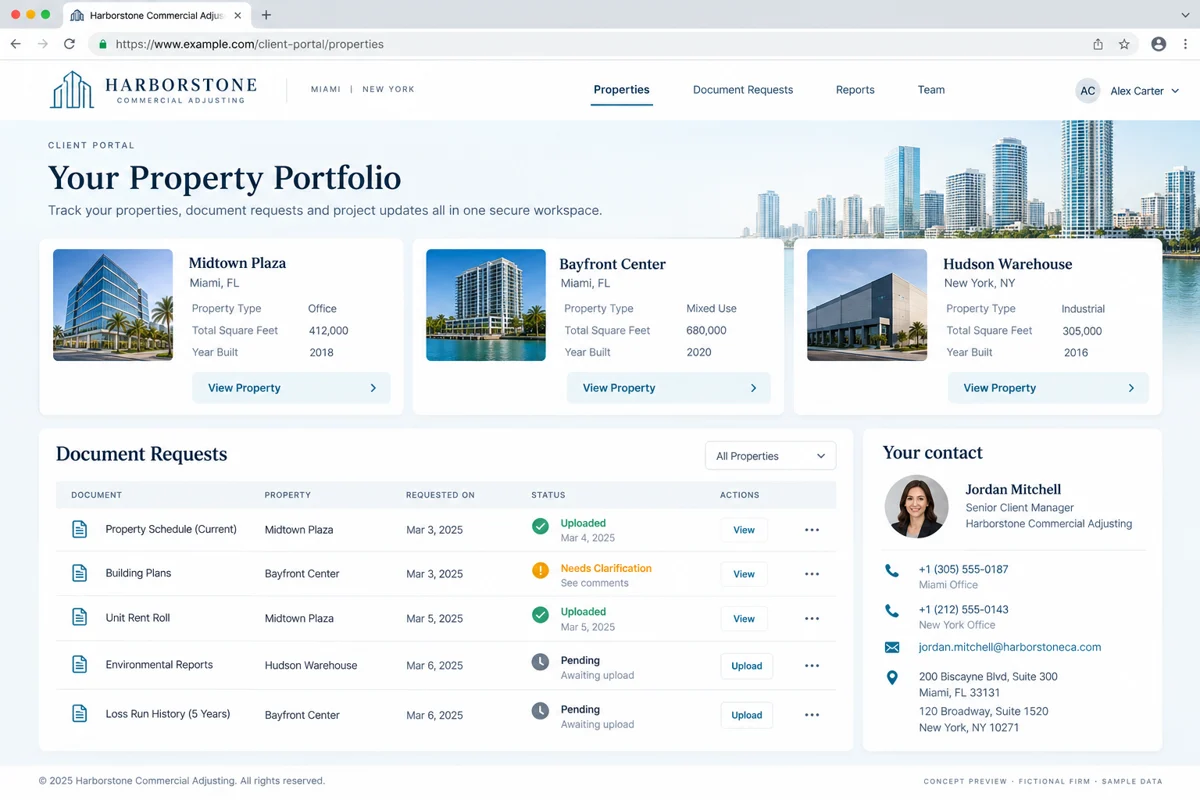
Organize the portal around claims and locations
A client may have several properties, legal entities and contacts on one engagement. Decide how those relationships work before picking a folder layout. Give each location a stable identifier, an understandable display name and the correct participants.
Make the upload path obvious. A person supplying documents for one building should not need to understand your internal project codes. Confirm the location and request on the upload screen, then attach the receipt to the same record.
Replace “please send everything” with a request checklist
Each request should identify the document, relevant period or location, responsible contact, due date if applicable and current state. Use states such as requested, received, needs clarification and accepted for review. Receipt is not the same as completeness.
An illustrative workflow: a property manager uploads a repair invoice, the reviewer needs the supporting detail and the request returns with a specific question. Keep that exchange attached to the request. Don’t make the client start a new email chain to learn what is missing.
Avoid automated reminders that keep arriving after a response. Pause or change reminders when the request moves to review, and make the next action visible to the team.
Decide what each client contact can see
Role design matters more than the login screen. A property manager may need one location, a corporate contact may need several and an outside specialist may need a limited document set. Define access before the invitation goes out.
SCM’s client-access tutorial distinguishes client-facing documents and notes from internal notes. That is a useful design example: a portal should deliberately publish information rather than expose the internal workspace by default.
Test access with separate sample accounts. Can one location’s contact see another location by changing a URL? Can a removed user still open a shared link? Include revocation, expired links and account recovery in acceptance testing.
Keep a version history people can use
Store who uploaded each file, when it arrived, its associated request and whether it replaces an earlier version. Keep originals when the retention process calls for them. Mark superseded documents clearly rather than quietly overwriting them.
Separate drafts from approved reports. Releasing a report should be an explicit action with a recipient and a recorded version. If a document is withdrawn or corrected, define how clients are informed and what they see when they return to the portal.
Publish useful status without exposing internal deliberation
A client needs to know the next step, the contact person and whether something is needed from them. They usually don’t need every internal task or an unexplained percentage-complete gauge.
Use reviewed, client-facing updates tied to milestones. If the next step depends on a third party, describe the dependency in terms the client can understand. Keep the portal from implying a coverage decision, payment promise or completion date that the team has not approved.
Notifications should point back to the portal. Decide which details belong in an email and which require sign-in before sending sensitive information.
Pilot with one client and a realistic document set
Choose a willing client contact and a manageable claim workflow. Import enough historical material to test search and version retrieval. Don’t begin by migrating every archive without a naming and retention plan.
- Ask the client to find a request and upload a response.
- Ask the reviewer to request clarification.
- Release a corrected report and find the earlier version.
- Remove an external participant and test access again.
- Export the file with its document history.
For a quote, bring a redacted request list, the location structure, user roles and the systems the portal must connect to. Scope document storage, scanning, access logs, backup and support explicitly. A portal is an operating process, not just a branded sign-in page.
Questions firms ask before starting
Can one client have multiple properties in the portal?
Yes. Model the client, claim and location relationships explicitly, then grant each contact only the access they need.
Is a shared drive enough?
It may work for a small, simple exchange. A portal becomes useful when requests, permissions, versions and client updates need a clear shared workflow.
Can clients see internal notes?
That should be an explicit design decision. A safer default is to keep internal notes private and release reviewed client-facing updates separately.
What should we measure after launch?
Track unresolved document requests, repeated requests, clarification cycles and time spent locating the released report. Compare against your own baseline.
References and editorial notes
These references provide industry context. The workflow recommendations and examples above are editorial design guidance, not a case study, an endorsement of a vendor or a statement of requirements in every state. Confirm applicable professional and client requirements with the people responsible for your firm.
Share a redacted document request list and your client roles. Deepak Softech can scope a portal with location-based access, document history and approved updates.
Plan your commercial claims portal ↗Custom insurance claims portals · Custom dashboard development
 Chat with us