The assignment says “sent.” The field adjuster says it never arrived. The carrier wants an update, and your coordinator is rebuilding the timeline from email. An assignment system earns its keep when it makes that conversation unnecessary.
Track each assignment from receipt through acceptance, inspection, report review and delivery. Give the file a responsible person, a timestamped status history and the carrier’s required checkpoints. Keep declined, unaccepted and returned assignments visible so dispatch can act on them.
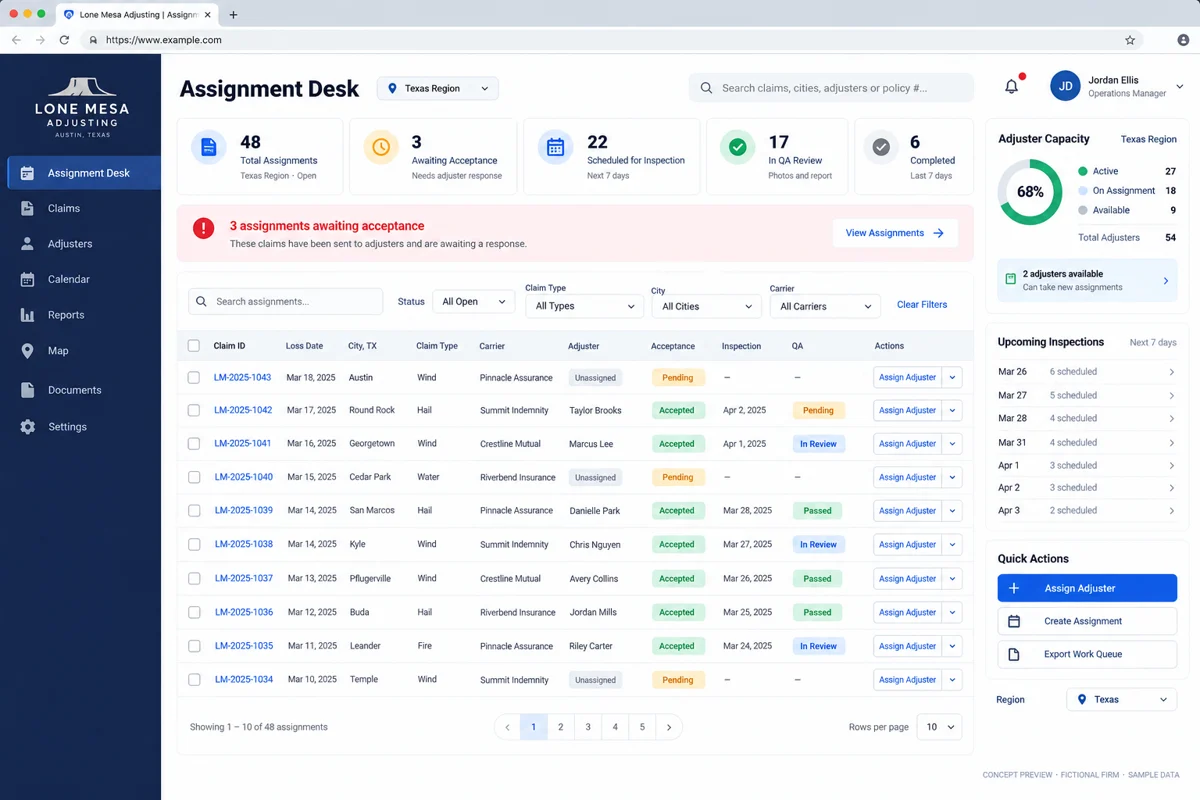
Separate “assigned” from “accepted”
Sending a notification doesn’t confirm capacity. Model receipt, assignment offered, accepted, inspection scheduled, report submitted, QA returned and delivered as distinct events. Your labels may differ, but the handoffs should be clear enough that a coordinator can explain them without opening an email thread.
Use an acceptance window appropriate to the assignment. If nobody accepts, return it to a visible queue and notify the coordinator. When an adjuster declines, capture a reason that helps dispatch: location, workload, specialty or another constraint. Don’t make staff use “other” for every response.
Route by eligibility and workload, then confirm
A map is useful, but distance alone won’t tell you who should take a file. Start with the client’s requirements, the loss location, the adjuster’s relevant qualifications, availability and current commitments. Treat roster information as something that needs an owner and a verification date.
VCA’s own product documentation describes assignment routing by location and workload, along with adjuster license records. That is a useful example of the data model to evaluate; it is not evidence that one vendor or algorithm fits every firm.
For a custom build, begin with coordinator approval rather than silent automatic assignment. Let the system suggest a short list and explain the matching factors. Preserve the option to override with a recorded reason.
Keep carrier instructions with the file
One client wants a particular report format. Another needs a different status cadence. Store the current instruction set with its effective date, and record which version applied when the file came in. A coordinator shouldn’t have to remember which attachment contains the latest checklist.
Use configurable checkpoints instead of copying the application for every carrier. Required photos, report sections and delivery steps should be testable rules, with exceptions routed for review. Confirm any supported exchange with the carrier or estimating platform; don’t assume an integration exists because both systems handle claims.
Make report review a queue, not a private inbox
When a report comes back for changes, show the return reason, reviewer, responsible adjuster and next due action. Keep the earlier version available without presenting it as the approved report. Distinguish internal QA completion from successful delivery to the client.
An illustrative test: the adjuster uploads a report, QA flags a missing photo reference, the adjuster corrects it and the reviewer approves it. Can the coordinator see that sequence and retrieve the delivered version? If not, the workflow still depends on someone’s memory.
Pilot one assignment type with one team
Start with a manageable client workflow. Import a small, cleaned roster and define the minimum assignment fields. Review duplicate detection, timezone handling, notifications and the fallback when an import fails. Test mobile use where field staff will actually work.
Have dispatch, one field adjuster and a reviewer run the same file. Include a declined assignment and a QA return, not just the successful path. Those exceptions reveal whether the system helps the coordinator or adds another screen to maintain.
- Can an unaccepted assignment be found immediately?
- Can the team identify the current owner?
- Can QA explain why a report was returned?
- Can management export the history without losing context?
What to scope before asking for a quote
Bring your assignment sources, roster fields, client checklists and report approval stages. Identify which system remains the official record for each piece of information. If you need to keep an existing claims platform, scope a dispatch layer around it before considering a full replacement.
Measure unaccepted assignments, time in each stage, QA returns and files waiting on someone outside the firm. Use those measures to find a bottleneck, not to create an unexplained score for individual adjusters.
Questions firms ask before starting
Can assignment software work with our existing claims platform?
Often the right first step is a dispatch layer or supported integration. Confirm the platform’s import, API and permission options during discovery.
Should dispatch be fully automatic?
Start with rules and coordinator approval when eligibility and exceptions need human judgment. Automate further only after the rules have been tested.
Can carrier workflows differ?
Yes. Design configurable checkpoints, instruction versions and approval stages rather than assuming every client has the same process.
What should the first dashboard show?
Unaccepted assignments, current ownership, upcoming inspections, reports awaiting QA and exceptions that need a coordinator’s decision.
References and editorial notes
These references provide industry context. The workflow recommendations and examples above are editorial design guidance, not a case study, an endorsement of a vendor or a statement of requirements in every state. Confirm applicable professional and client requirements with the people responsible for your firm.
Share a redacted assignment and your dispatch stages. Deepak Softech can scope a tracking dashboard, assignment rules and the integrations your team actually needs.
Plan your assignment-to-report workflow ↗Insurance claims workflow software · Custom software development
 Chat with us